 copy.top
You have a wallet open in one tab and a leaderboard in another. A trader you've been watching for a week just opened a position, so you hit copy, approve the signature, and watch the same position appear in your own wallet a few seconds later.
Nothing in that flow tells you who holds the keys, who authorized what just happened, or who eats the loss if the trade goes wrong. Those three questions are what self custody crypto is really about. The wallet is yours, which means the answers end with you, including the one where nobody can undo a mistake.
This walks through the model in the order a trader meets it. What you control. What breaks. What you do first when it breaks. Trading memecoins, perps and prediction markets carries risk, and you can lose what you put in.
Table of Contents
- What Self-Custody Means in Crypto
- Custodial Versus Self-Custody Compared
- How Keys, Seed Phrases and Permissions Work
- Benefits and Trade-Offs of Holding Your Own Keys
- How to Set Up and Protect a Self-Custody Wallet
- Recovery Planning After Compromise, Loss or Death
- Copy Trading From a Self-Custody Wallet
- Decide If Self-Custody Fits Your Trading Setup
What Self-Custody Means in Crypto
A bank account and a locked box hold money in two different ways. In the bank account, someone else keeps the ledger. The bank can freeze a payment, reverse a transfer it decides was a mistake, or close the account on a Tuesday morning. In the locked box, the holder has the only key, and nobody on the other side of the transaction can reach in and undo what has already happened.
The core idea: self custody means the user, not an exchange or other intermediary, controls the private keys or signing authority that move the crypto.
The Investor.gov crypto asset custody bulletin frames it as control over the private keys rather than assigning that control to a third-party custodian, and adds the part many skip: that control creates an operational burden.
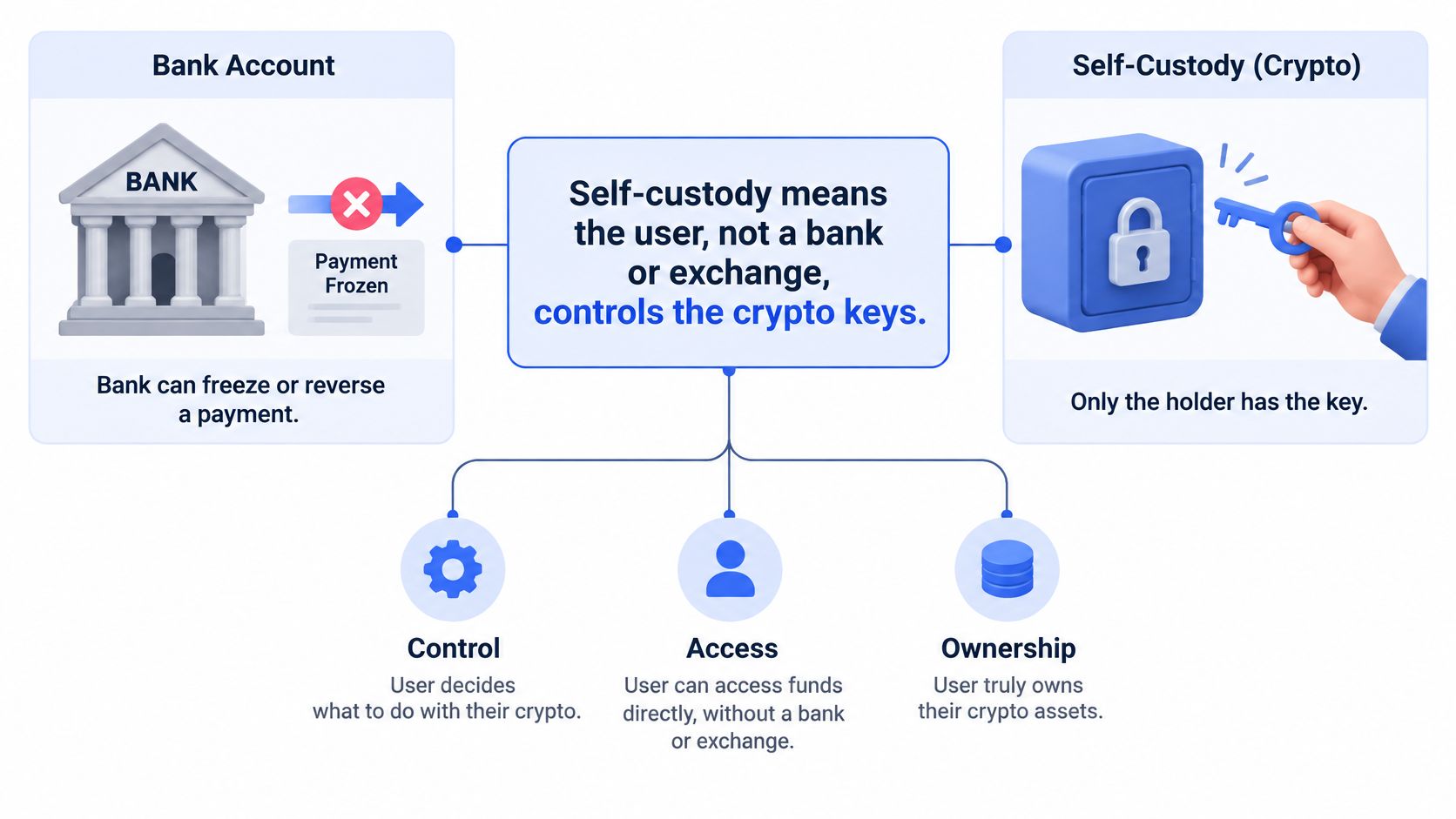
Two wallet parts matter early. The public address works like an account number, the string you hand to someone so they can send funds to you. The private key works like the signature that releases funds from that address. One is safe to share. The other ends the conversation the moment anyone else has it.
Here's the detail that surprises people new to the model. A private key cannot be changed or replaced after it is created. The same bulletin states that if the key or recovery phrase is lost, the owner can permanently lose access to the assets, and that theft, hacking, physical damage or accidental disclosure can produce the identical result.
That is why a non-custodial app is different from a custodial one. The app never holds your funds, so no provider can reverse an unauthorized transfer or rebuild a credential you destroyed. Copying trades from a public trader doesn't remove any of that. It adds execution risk, because every copied order still spends your money.
Two checks you can run today
- Can you export the key? Open your wallet settings and look for an export or "show private key" option. If it isn't there, you're renting access, not holding it.
- Can you name who restores access if your phone dies? If the honest answer is a support ticket, the backup isn't finished.
Custodial Versus Self-Custody Compared
The table answers the question, which is who controls what at each step.
| Factor | Custodial platform | Self-custody wallet |
|---|---|---|
| Who holds the private keys | The platform | You |
| Who can reverse a mistaken transfer | Usually the platform, depending on its policy | No one once the transaction is confirmed on chain |
| Recovery after a lost login | Platform support can reset access | Only your seed phrase or key can restore access |
| Who can freeze withdrawals | The platform | No third party in a non-custodial app |
| Exposure if the platform fails or is hacked | Your balance sits with the platform | Funds stay in your wallet, but an approved contract can still move them |
| Who authorizes each trade | The platform acting on your account | You, by signing or by an allowance you granted |
| Main duty you carry | Platform trust and account security | Seed phrase, device, approvals and transaction review |
Read the rows as a swap, not a scoreboard. A custodial service trades personal responsibility for provider help, and you pay for that help with counterparty exposure and permission. Self-custody trades provider help for direct control, and you pay for that control with direct responsibility.
One confusion worth clearing up: a wallet can be self-custody while the apps it connects to still lean on third-party services. Check each connection on its own terms rather than assuming the whole stack inherits your key model.
The overview of how copy trading actually executes is useful here, because it shows where authorization sits when orders arrive from someone else's decision.
The question the table forces is simple. Which set of risks can you carry without outside help, and which ones do you need someone to absorb for you? There's no universal answer, but there is a wrong one: holding keys you can't restore.
How Keys, Seed Phrases and Permissions Work
The chain runs in one direction. A seed phrase of 12 or 24 words regenerates every key in the wallet, so anyone holding those words controls everything that wallet opens. A private key signs transactions for one account. Each signature authorizes one specific action. Permissions sit underneath all of it, and they're the part most readers skip.
| Element | What it does | What it allows | What to check |
|---|---|---|---|
| Seed phrase | Regenerates every key in the wallet | Anyone holding it can move funds | Store offline, never in a chat, photo or cloud note |
| Private key | Signs transactions for one account | Anyone holding it controls that account | Export only to a device you trust |
| Unlimited token approval | Lets a contract spend a token without a set cap | Stays active until revoked | Check approvals and revoke those you no longer use |
| Capped allowance | Lets an app spend up to a set amount | Ends at the cap or when revoked | Set the smallest size you can accept |
| Transaction signature | Authorizes one specific action | Only that action | Read the destination, amount and chain on the signing screen |
What permissions actually allow
A token approval is not a one-time payment. It's a standing permission that a contract can keep using until you take it away, and an unlimited approval has no ceiling inside it. A capped allowance is the same idea with a fence around it. Revoking is a separate transaction, and it's one you should know how to do before you need it.
That's why a token approval checker belongs in your routine rather than your emergency folder. Approvals accumulate across chains, and old ones outlive the app you granted them to.
Two limits matter in a copy trading setup built on your own wallet. The trading allowance you grant can be revoked at any time, and copy.top cannot withdraw funds from that wallet. Those two facts define the boundary: automation can act inside the permission you gave, and not outside it.
Benefits and Trade-Offs of Holding Your Own Keys
What you gain
- No one can freeze your account. There's no compliance queue, no regional restriction, no account closure email.
- You move across chains without asking. Funds go where you send them, on the schedule you choose.
- You can separate trading capital from savings. Two wallets, two risk levels, one seed phrase backup per wallet.
- Every transaction is visible on chain. You can audit your own history without a support ticket.
What it costs
- There is no support desk. Nothing reverses a signature you approved by mistake.
- A lost key cannot be replaced. No recovery process exists beyond the backup you made.
- Phishing and malicious approvals target you directly. Attackers no longer need to breach an exchange to reach your balance.
Where the risk actually moved
Chainalysis data summarized by Axis Intelligence shows personal wallets accounted for 44% of all stolen cryptocurrency value in 2024. Two years earlier the split was very different: Chainalysis reported that compromises of personal wallets were only 7.3% of all stolen crypto value in 2022, rising to roughly $1.5 billion taken from personal wallets in 2024, per its crypto hacking and stolen funds analysis.
That shift isn't a reason to hand your keys back to a platform. It's a reason to change what you defend. Personal-wallet theft in 2024 ran through phishing, malware, malicious approvals and leaked credentials, the methods that get control of a wallet rather than breaking a server. Reporting on AMLBot's investigation of 2025 crypto incidents found roughly two-thirds of the incidents it examined involved social engineering rather than technical exploits.
Control and responsibility arrive in the same transaction. You can't take one and return the other.
The protection steps are mechanical, and they're covered in the setup section that follows.
How to Set Up and Protect a Self-Custody Wallet
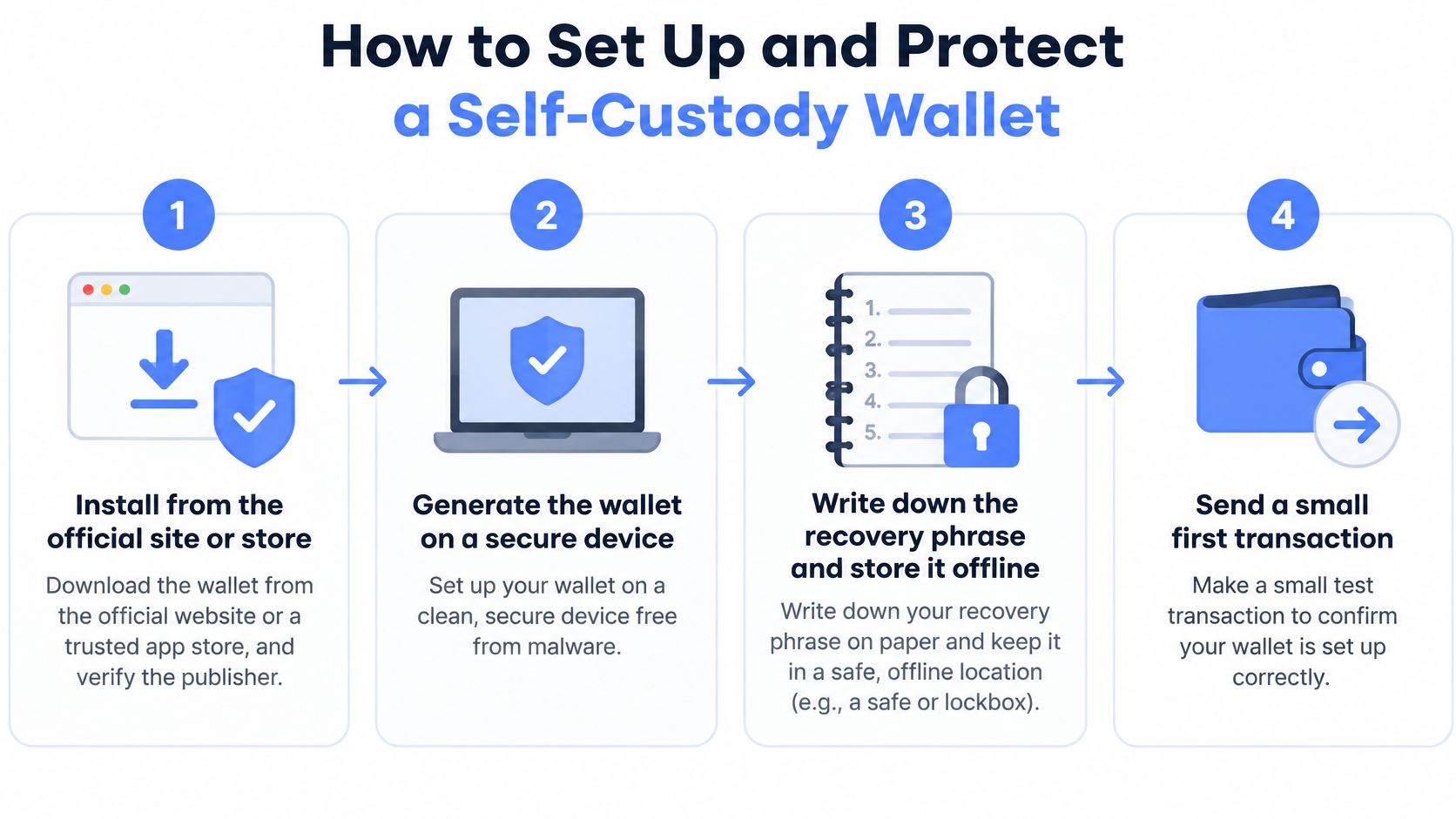
Order matters more than tools here. Each step below removes a specific way funds get taken.
- Install from the official source. Download the wallet from its own website or its official app store listing, then confirm the publisher name before you open it. A convincing copy of a popular wallet is one of the cheapest routes to someone else's key.
- Generate the wallet on a device you control. Not a borrowed laptop, not a shared family machine. The seed phrase appears on that screen at that moment, and anyone watching reads it with you.
- Write the phrase down twice, by hand or on metal, and store the copies in separate places. No screenshot, no photo, no cloud note, no chat message. Photo libraries sync to accounts you may not control.
- Prove the backup works before you fund it. Restore the phrase into a second wallet holding a small balance, then wipe it and restore again. An untested backup is a hope, not a plan.
- Split the money. Keep a small operating balance in a hot wallet for trades and hold the rest in a wallet you don't connect to anything. A compromise then costs you the operating balance, not the savings.
- Read the signing screen before every approval. Destination address, amount, token contract, chain. Reject anything that differs from what you intended, even when the page looks correct.
- Review approvals every few weeks and after each new protocol. Revoke what the app no longer uses. Old permissions outlive the reason you granted them.
- Send a test withdrawal first. A small amount confirms the route, the chain and the address before a larger sum follows.
Where a hardware signer changes the risk
A hardware wallet removes one specific failure: key exfiltration. The NIST guidance on hardware wallets describes devices that keep private keys in a secure enclave and sign transactions without revealing the key to applications, which stops malware on a companion computer from copying it.
What the device doesn't fix is approval risk. You still have to verify the destination, the token contract, the permissions and the value on a trusted display. NIST calls this "what you see is what you sign" and pairs it with device-integrity checks, supplier signatures and security updates. In practice, material balances sit behind a hardware signer while browser prompts stay untrusted until the device screen confirms the same action.
Desktop malware is one of the routes a signing prompt gets swapped, so keep malware protection for cryptocurrency trading current on the machine you use for wallet work.
A healthy setup has two markers. You can restore access on a second device without help, and you can explain every approval currently live on your addresses.
Recovery Planning After Compromise, Loss or Death
Phishing and social engineering are the usual way in, so the entry point is rarely a broken algorithm. It's a fake support message, a copied signing prompt, or an approval you didn't read.
Recent figures cited in self-custody wallet adoption reporting show 158,000 personal-wallet compromise incidents and approximately $713 million stolen from individual victims during 2025. The operational risk shows up in the same survey summary, where 70% of users worry about losing funds if a wallet is lost or damaged and 62% worry about irreversible transaction errors.
Hot wallet, savings wallet, heir wallet
The structure is the plan. A capped experimental wallet holds trading capital. A separate savings wallet stays disconnected from dapps. A written document tells a trusted person where the backups live, without handing them signing authority while you're alive.
| Scenario | First action | Who needs access |
|---|---|---|
| Device lost or broken | Restore the seed phrase into a new wallet | You, with the offline backup |
| Suspected phishing or a bad approval signed | Move funds to a new wallet and revoke old approvals | You, from a device you trust |
| Seed phrase exposed | Treat the wallet as compromised and move funds to a new wallet | You, with a new wallet |
| Trading wallet balance too high | Split capital into a smaller operating wallet | You |
| Holder dies | Follow written instructions to restore access | A trusted person named in your plan |
Once a wallet is exposed, stop reusing its seed phrase entirely. Move what's left, revoke approvals on the old address, and treat that wallet as burned. Exporting a key raises exposure, so do it only on a device you trust, and never store the export in a file that syncs.
Across chains, record which networks each wallet covers, because one phrase can open several addresses and an heir needs to know which ones hold value. For an estate, inheriting crypto assets in Texas covers the probate side that a seed phrase backup alone doesn't address, including how an executor documents and transfers the assets.
Copy Trading From a Self-Custody Wallet
Two followers copy the same long from the same trader. One risks a small slice of the account at low exposure. The other commits a much larger slice at high exposure. The trade goes against both of them. The second follower's loss arrives faster and can end at liquidation while the first is still holding, even though the entry, the exit and the trader were identical.
Copying a trader copies their timing. It does not copy their risk. Copied orders use your funds, your collateral and your borrowing power, so custody of the wallet stays with you and execution risk stacks on top of it.
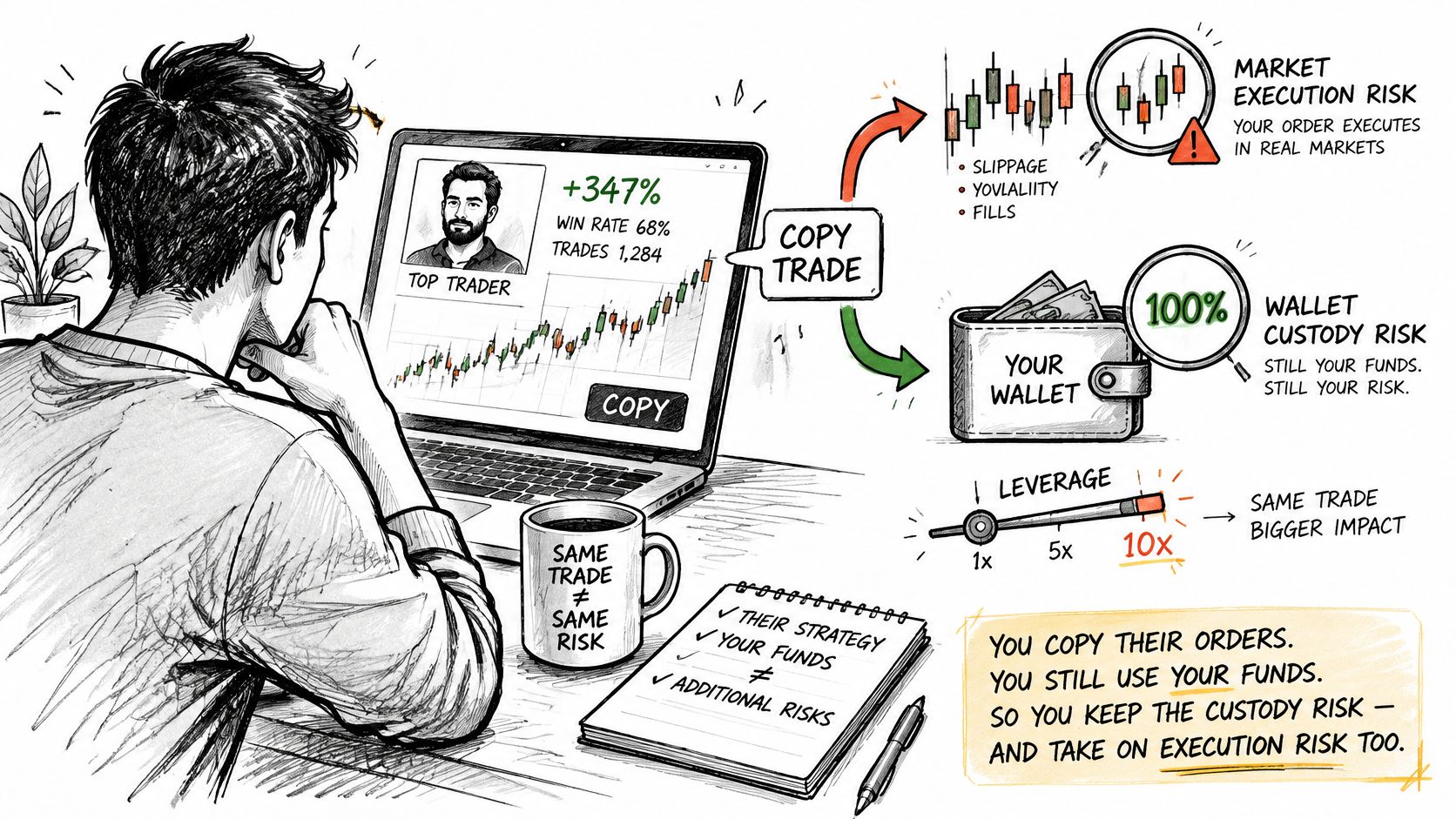
Margin widens that gap fast. The CFTC's advisory on the risks of virtual currency trading explains that leveraged positions are funded with only a fraction of the underlying value, so a small price move has a larger effect on the account, and notes that perpetual futures markets may offer leverage such as 50x to 100x, where routine moves can wipe out a position or trigger rapid liquidation. Those figures describe what exists in those markets. They are not a target.
Perpetuals carry a second cost that spot traders don't expect. The CFTC explainer on perpetual contracts_0.pdf) describes a funding-rate mechanism paid periodically between long and short positions to keep the contract near spot, and notes that a losing position does not expire on its own. A copied perp position can bleed funding while you sleep, even when the price barely moves. Direction alone doesn't capture a trader's risk when position size, margin and funding exposure all differ.
Practical rule: set the size you can lose completely before you look at anyone's win rate, then read the record alongside position size and leverage.
The operating model matters here. Ask who holds the keys, who authorizes each order, and who absorbs the mistake. In copy.top, the answers stay with you: followers copy from their own non-custodial wallet, the key can be exported at any time, and every order is sized by the follower rather than the trader. You pick a named trader from a public page showing realized pnl, win rate, median hold time, open positions and recent trades. Traders come from the fomo app, pumpfun, Hyperliquid perps and Polymarket prediction markets, with tokens copied across Solana, Base, BNB Chain, Ethereum, Robinhood Chain and Arc, and perps on Hyperliquid. Buys and sells are both copied, so positions close when the trader closes, and guardrails like first buy only, take profit and stop loss let you bound what the copy can do before it starts.
Public numbers describe past results and say nothing about the next trade. A trader with a strong record can still dump into their own copiers, which is why fair play flags exist to mark that behavior.
The step-by-step guide to copying a trader covers the mechanics of sizing and exit settings once you've picked someone.
Copy trading carries risk, and users can lose what they put in. Past performance does not predict results.
Decide If Self-Custody Fits Your Trading Setup
Treat this as an operating test, not a philosophy debate. Self-custody fits when you can answer yes to most of the checklist below.
- You can store a seed phrase offline and restore it. You've done it once on a second device, not just read about it.
- You accept that a lost key is permanent. No support channel undoes it.
- You keep trading capital separate from savings. One wallet for experiments, one for the rest.
- You read the signing screen. Destination, amount, contract, chain, every time.
- You revoke approvals you no longer use. It's a routine, not a reaction.
- You accept that a copied trade can lose money fast. Faster than you can close the tab.
Several no answers don't disqualify you from trading. They change the size you keep in a hot wallet and the recovery setup you build before funding it.
The first move
Start small. Fund a capped wallet, copy one trader at a size you'd accept losing, send a test withdrawal, then confirm you can restore access on a second device. Copied funds sit in a wallet you can export the key to and withdraw from whenever you want. In /settings under my wallets, you can move everything, cash, tokens and positions, into your personal wallet without selling anything, and the screen shows exactly what changes before you confirm.
Pick a named trader with a public record on copy.top, where trader pages show realized pnl, win rate and recent trades. You can also add funds through /deposit with crypto, Apple Pay or Cash App, then use /withdraw to send funds to your own wallet as USDC or send a token out as-is.
Self-custody puts the keys, the signing and the consequences in the same pair of hands. A copy trading bot does not move them elsewhere. copy.top lets you follow named traders from fomo, pumpfun and Hyperliquid from a wallet you control, with a revocable trading allowance and a key you can export at any time. You choose the trader and the size. Copies can run when you are asleep, and copied positions can close through the trader's sell, your take profit or your stop loss. That means your setup must define who can act, what allowance they have and what you will do if a trade goes wrong. Start at a size you'd accept losing, because you can lose what you put in and past performance does not predict results.